Device layout
General layout
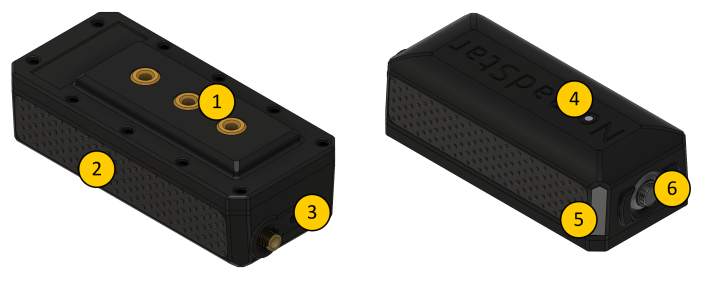
- TM5 modular attachments system
- Silicon grip
- USB-C connector
- RGB status LED
- Aluminium identification plate
- Power / Shutdown button
Component details
TM5 Modular Attachment System
A modular attachment system
Modular attachmentmounting system basedfeaturing on 3three M5 threads.threaded Caninserts.
It beallows usedyou to securely attach furthercompatible accessories toor yourcustom radio.
Silicon grip
Ensure a steady hold in hand.
RP-SMA antenna connector
Antenna connector allowing for antenna quick change while travelling across different LoRa regions.
USB-C connector
USB-C connector usedmounts to charge the Meteor Pro. It also support data transfer
Designed for firmware updatestrength and serialversatility communication.in professional field use.
Silicone Grip
Durable silicone side grip ensures a secure and comfortable hold, even in wet or cold environments.
RP-SMA Antenna Connector
Standard RP-SMA connector enabling quick antenna swaps when traveling between different LoRa frequency regions.
Use only certified antennas corresponding to your regional frequency band.
USB-C Connector
The USB-C port is used for:
-
Charging the internal battery
-
Firmware updates
-
Serial communication (via Web Serial or USB connection)
Use a high-quality, data-capable USB-C cable for reliable operation.
RGB statusStatus LED
Device status indication
| Status | Meaning |
| OFF | Device shutdown / OFF |
| ON | Device powered ON |
| Rainbow blinking | New message received |
| Steady red | Low battery |
Additionally, the LED can be customised and configured using the Meshtastic ambient lighting feature.
Aluminium Identification Plate
Engraved identification plate
Identificationfor platemodel thatand canserial beinformation.
Custom engraveengraving with(e.g., customname, informationunit whenID, orderingor yourcallsign) Meteoris Proavailable upon order.
Power / Shutdown button
Button
ButtonMain usepower control button for the Meteor Pro.
-
Short press: Power ON
-
Press and hold (≥5 seconds): Power OFF
Avoid holding the button during boot to powerprevent on/offunintended theshutdowns.