# Device layout
### General layout
[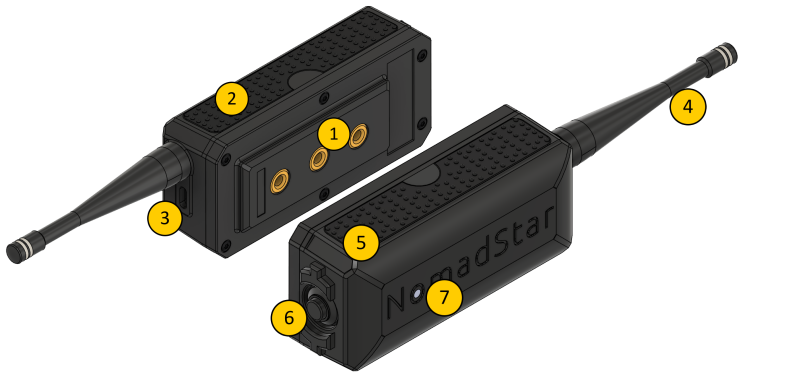](https://glacier.alpservices.link/bookstack-nomadstar/uploads/images/gallery/2026-04/Ol3blaj5ZrSNOA2M-image.png)
1. TM5 modular attachments system
2. Silicon grip
3. USB-C connector
4. Antenna
5. Stainless steel ID plate
6. Power / Shutdown button
7. RGB status LED
### Component details
### TM5 Modular Attachment System
A modular mounting system featuring three M5 threaded inserts.
It allows you to securely attach compatible accessories or custom mounts to the Meteor Pro.
Designed for strength and versatility in professional field use.
M5 screw max length 5mm, 6mm with a washer
---
### Silicone Grip
Durable silicone side grip ensures a secure and comfortable hold, even in wet or cold environments.
---
### RP-SMA Antenna Connector
Standard RP-SMA connector enabling quick antenna swaps when traveling between different LoRa frequency regions.
Use only provided antennas corresponding to your regional frequency band.
---
### USB-C Connector
The USB-C port is used for:
- Charging the internal battery
- Firmware updates
- Serial communication (via Web Serial or USB connection)
Use a high-quality, data-capable USB-C cable for reliable operation.
---
### RGB Status LED
| Status | Meaning |
| OFF | Device shutdown / OFF |
| ON | Device powered ON |
| Rainbow blinking | New message received |
| Steady red | Low battery |
Additionally, the LED can be customised and configured using the Meshtastic [ambient lighting](https://meshtastic.org/docs/configuration/module/ambient-lighting/) feature.
---
### Stainless steel Identification Plate
Engraved identification plate for model and serial information.
Custom engraving (e.g., name, unit ID, or callsign) is available upon order.
---
### Power / Shutdown Button
Main power control button for the Meteor Pro.
- Short press: Power ON
- Press and hold (≥5 seconds): Power OFF