Statement: If the device is not used in accordance with the manufacturer's specifications and intended use, risks may arise.
Statement: Before using this device, carefully read this user manual in its entirety. Understanding the information provided is essential for safe and effective operation. Failure to follow the instructions and safety precautions may result in injury, damage to the device, or voiding of the warranty. Keep this manual handy at all times for reference during use and maintenance.
# Package content The Meteor Pro packaging contains: - A Meteor Pro LoRa mesh radio - A stainless steel 304 belt clip - A LoRa antenna for your region (868Mhz or 915Mhz) - A 1m USB-C<->USB-C charging and data cable - Accessories (reset key, clip installation key, goodies) **Product name:** Meteor Pro **Release year:** 2026 **Country of origin:** Switzerland # Device layout ### General layout [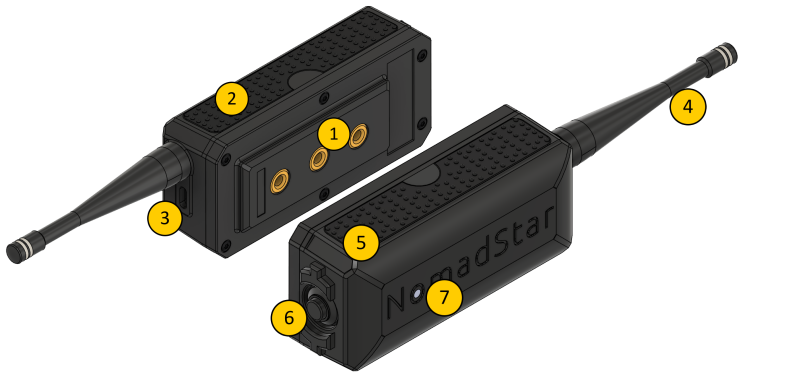](https://glacier.alpservices.link/bookstack-nomadstar/uploads/images/gallery/2026-04/Ol3blaj5ZrSNOA2M-image.png) 1. TM5 modular attachments system 2. Silicon grip 3. USB-C connector 4. Antenna 5. Stainless steel ID plate 6. Power / Shutdown button 7. RGB status LED ### Component details ### TM5 Modular Attachment System A modular mounting system featuring three M5 threaded inserts. It allows you to securely attach compatible accessories or custom mounts to the Meteor Pro. Designed for strength and versatility in professional field use. M5 screw max length 5mm, 6mm with a washer --- ### Silicone Grip Durable silicone side grip ensures a secure and comfortable hold, even in wet or cold environments. --- ### RP-SMA Antenna Connector Standard RP-SMA connector enabling quick antenna swaps when traveling between different LoRa frequency regions. Use only provided antennas corresponding to your regional frequency band. --- ### USB-C Connector The USB-C port is used for: - Charging the internal battery - Firmware updates - Serial communication (via Web Serial or USB connection) Use a high-quality, data-capable USB-C cable for reliable operation. --- ### RGB Status LED| Status | Meaning |
| OFF | Device shutdown / OFF |
| ON | Device powered ON |
| Rainbow blinking | New message received |
| Steady red | Low battery |
**Do not use the USB-C connector while the unit is wet**. If exposed to moisture, allow it to dry completely before connecting to USB-C. Charge only between +10°C and +45°C.
--- ### Antenna assemblyThe antenna should be firmly screwed onto the RP-SMA connector but do not force. You may damage the antenna or the RP-SMA connector
Expected result: [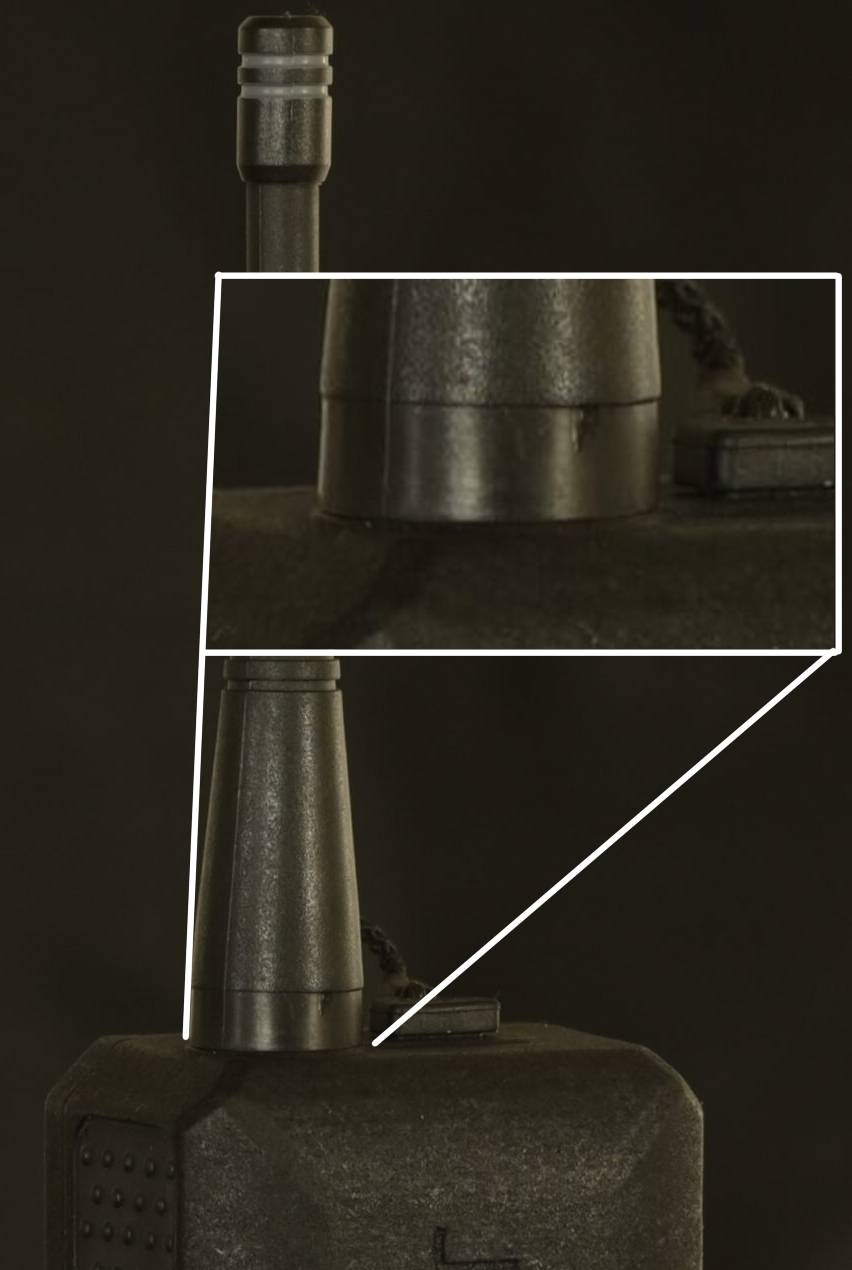](https://glacier.alpservices.link/bookstack-nomadstar/uploads/images/gallery/2025-09/VmvwRXBtTk02Zm3S-antenna-connector-meteor-pro.jpg) --- ### Environmental considerations - Operating temperature: -20 °C to +60 °C - Relative humidity: 0 % to 100 % (non-condensing) - Suitable for indoor and outdoor use (IP66). - Not suitable for explosive (EEx) or flammable environments.Improper installation or use may lead to electric shock, fire, or permanent damage to the unit. Follow all power and mounting instructions precisely.
--- ### Transport instructions To ensure safe transport and preserve device integrity: - Switch off the device before packing or transport. - Use the original packaging or equivalent protective foam to avoid shock and vibration damage. - Keep the device away from magnets, flammable materials, solvents and moisture during transport. - If transporting by air, comply with Li-ion battery transport regulations (IATA/ICAO). - Do not transport a device that shows signs of battery swelling, leaks or mechanical damage. --- ### Shipping instructions To ensure safe shipping and preserve device integrity: - Switch off the device before packing. - Use the original packaging or equivalent protective foam to avoid shock and vibration damage. - Keep the device away from magnets, flammable materials, solvents and moisture during shipping. - If shipping by air, comply with Li-ion battery shipping regulations (IATA/ICAO). - Do not ship a device that shows signs of battery swelling, leaks or mechanical damage.Do not ship the device with a connected antenna — remove it to prevent mechanical stress on the RP-SMA connector.
# Operation - Meshtastic [Meshtastic](https://meshtastic.org/) is an open source, off-grid, decentralized mesh network. No cell towers, no internet, no subscription and no infrastructure required. Just pure peer-to-peer connectivity. ### Meshtastic APPs There is many ways available to interact with your Meteor Pro. Meshtastic publishes Android and iOS apps, as well as a web client, an ATAK integration and more. You can find more details about available apps here: [meshtastic.org/docs/software/](https://meshtastic.org/docs/software/) One form of a Meshtastic APP is required for the initial setup of your Meteor Pro described in the following chapter "First boot and initial setup". The following chapter takes the [Meshtastic Android app](https://meshtastic.org/docs/software/android/installation/) as an example but those settings can easily be applied to all flavour of the Meshtastic app. ### First boot and initial setup The following process is required when you boot your Meteor Pro for the first time. This process takes 5 minutes and will guide you throw some essentials required for you and your Meteor to be able to communicate with others.A reboot of the Meteor is required to change certain settings. Don't worry if the Meteor reboots after changing settings and clicking on "Save".
1. Attach the supplied antenna securely to the RF connector. Using only 2 fingers screw on the provided antenna on the RP-SMA antenna connector ([3](https://docs.nomadstar.ch/books/meteor-pro-user-manual-en/page/device-layout "Device layout")). Stop screwing once the antenna is flush with the enclosure. 2. Press briefly and immediately release the Power button, wait 5 seconds. The indicator LED lights up and the Meteor is now "ON". 3. Connect to the device via Bluetooth 5.0 using the supported [Meshtastic app](https://meshtastic.org/downloads/). 4. Click on "Set your region" 5. Select the region matching your approximate location 6. Select the radio preset that you want to use and click on "Save" at the very bottom of the page. More details about radio presets here: [meshtastic.org/docs/configuration/radio/lora](https://meshtastic.org/docs/configuration/radio/lora/#use-preset) 7. Under "Device configuration > User" set the short and long name of your node. Those names are displayed to other Meshtastic users and is used as an identifier. 8. Finally under "Device configuration > Bluetooth" set a custom Bluetooth PIN for your Meteor.Default Bluetooth password: **123456**
3\. [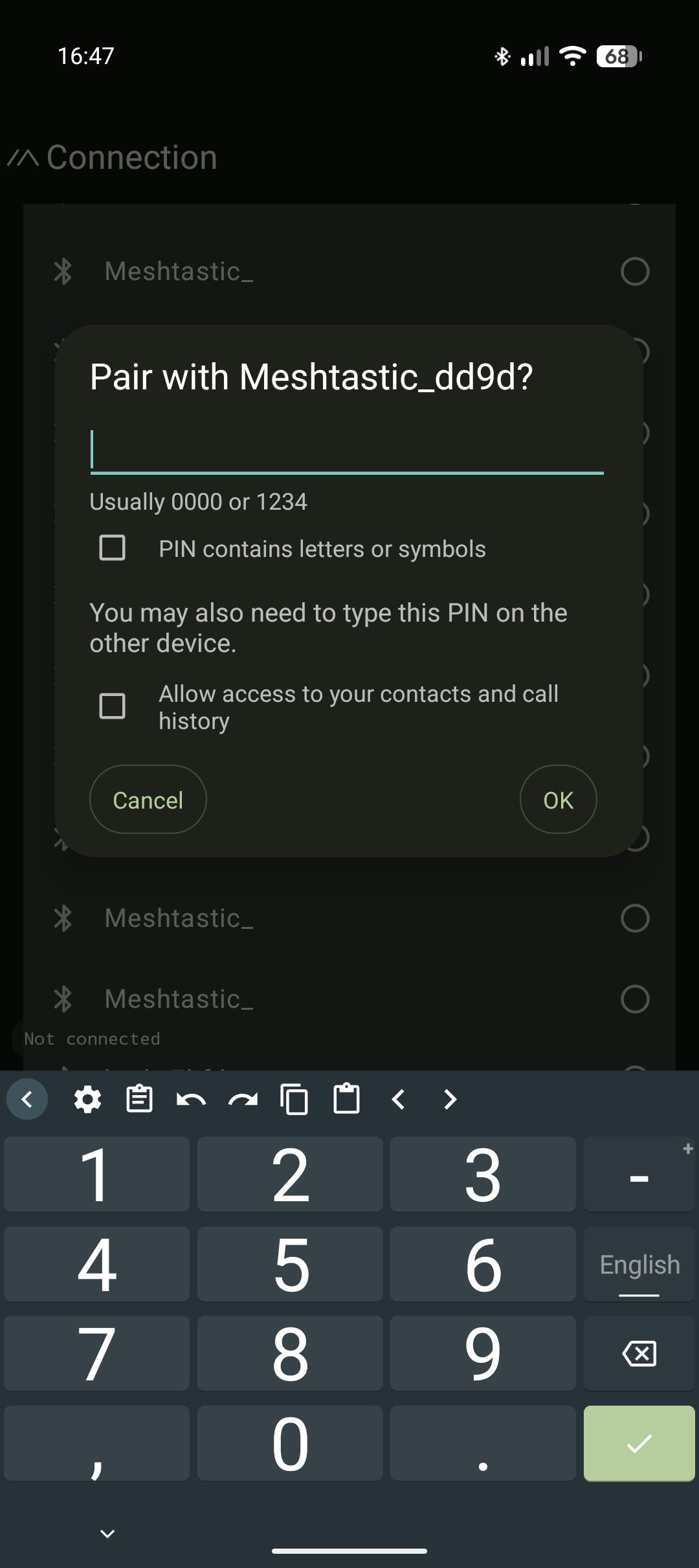](https://glacier.alpservices.link/bookstack-nomadstar/uploads/images/gallery/2026-01/3r56HKvUJmjADfnW-screenshot-20260129-164705.png) 4.[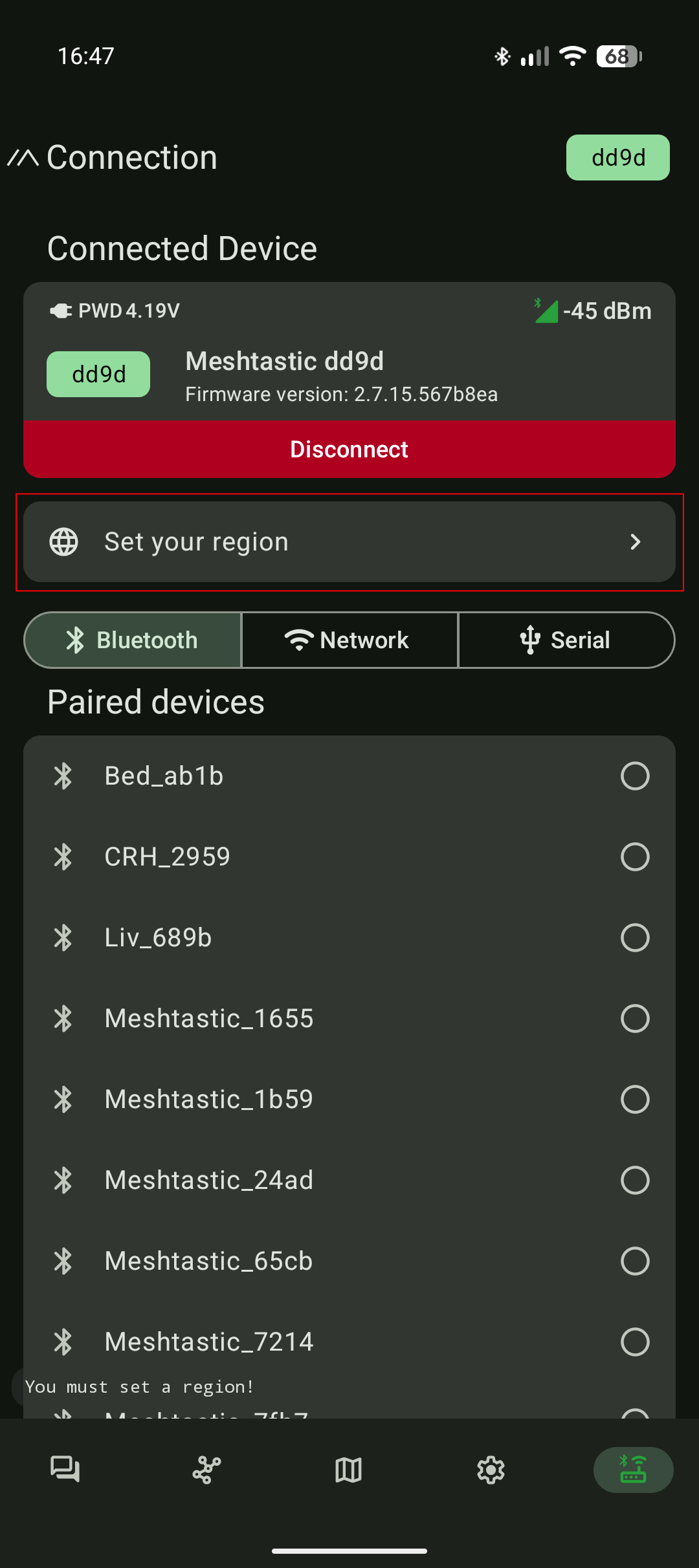](https://glacier.alpservices.link/bookstack-nomadstar/uploads/images/gallery/2026-01/J1xZTIfax9xbfSHc-screenshot-20260129-164724.png) 5.[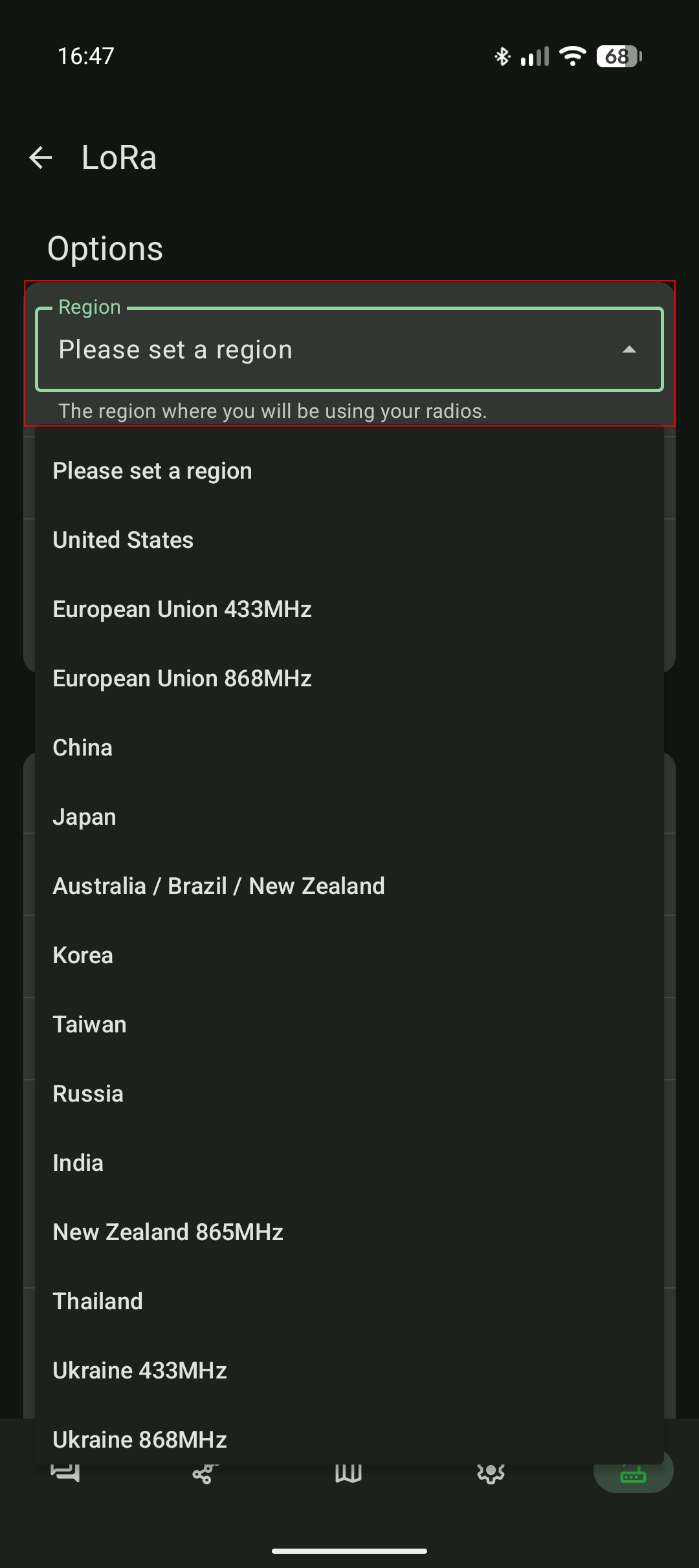](https://glacier.alpservices.link/bookstack-nomadstar/uploads/images/gallery/2026-01/QoHGBylLNtqaaR6v-screenshot-20260129-164733.png) 6\. [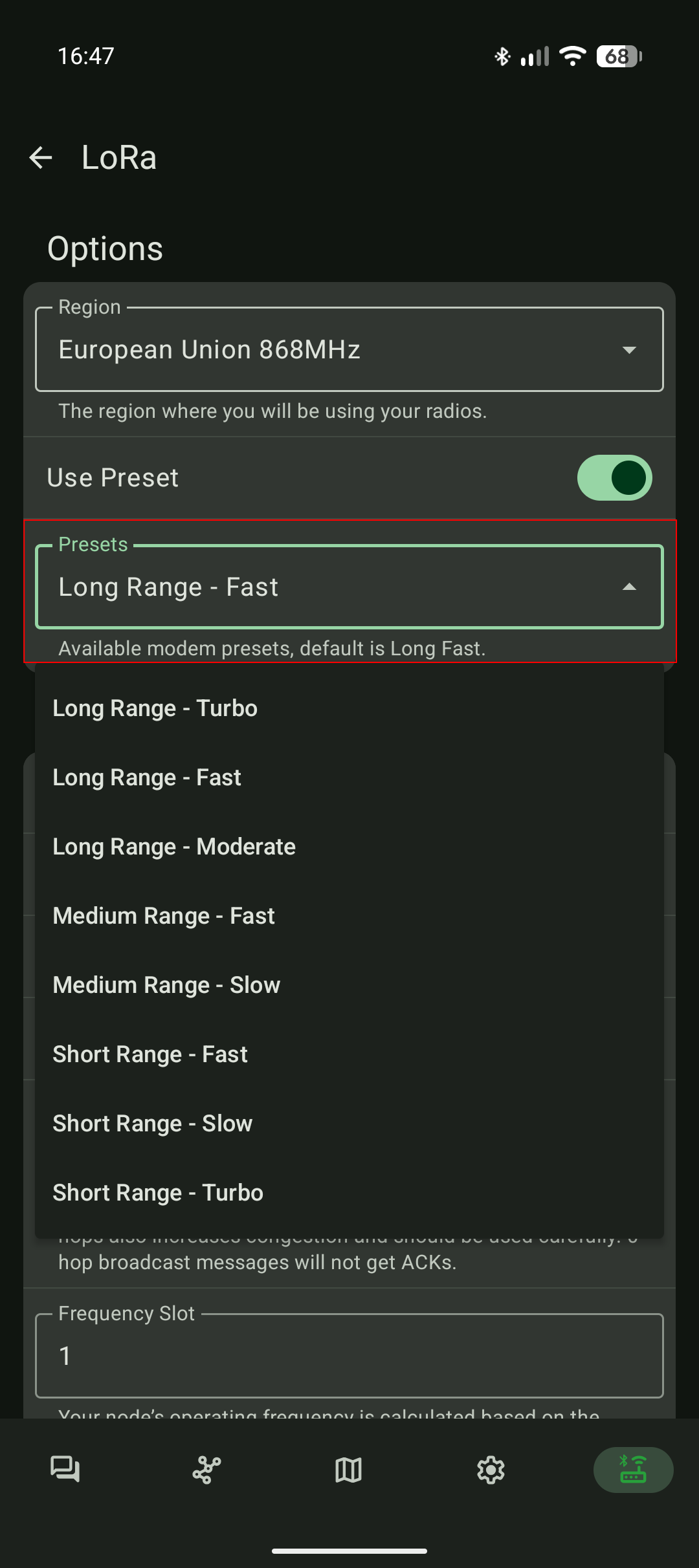](https://glacier.alpservices.link/bookstack-nomadstar/uploads/images/gallery/2026-01/4e1QBZHDbQwzb0GW-screenshot-20260129-164743.png) 7.[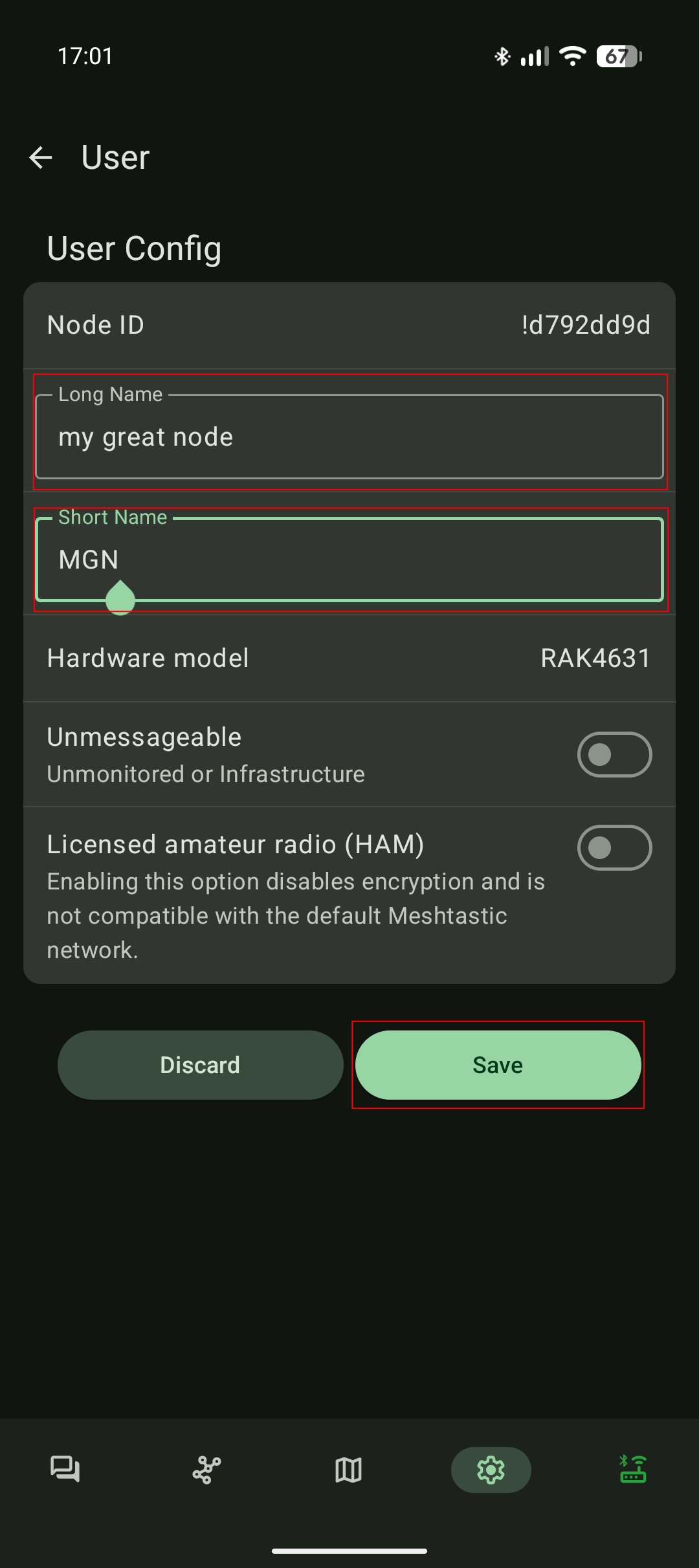](https://glacier.alpservices.link/bookstack-nomadstar/uploads/images/gallery/2026-01/YCdDj70CM0qtAcpi-screenshot-20260129-170122.png) 8.[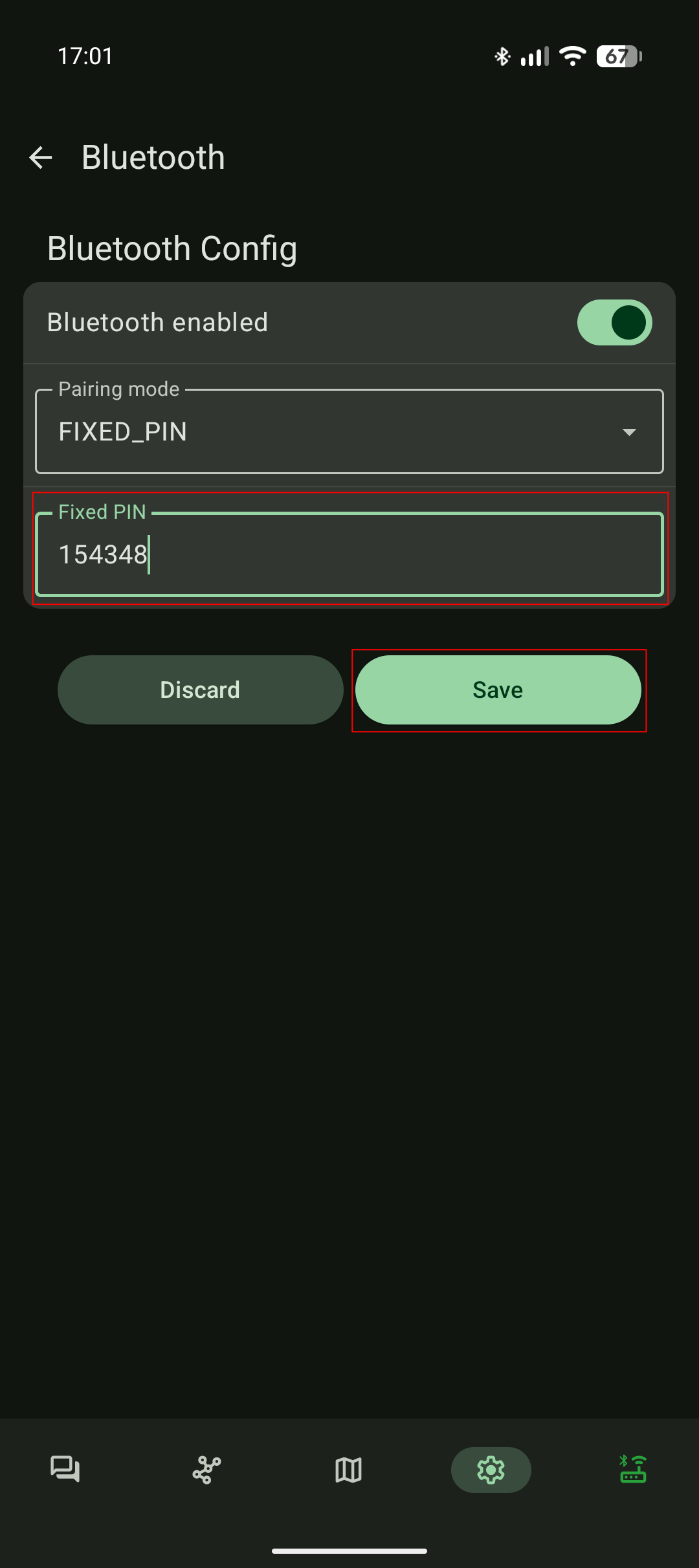](https://glacier.alpservices.link/bookstack-nomadstar/uploads/images/gallery/2026-01/1LnnPyHeNbjvK3Es-screenshot-20260129-170150.png) ### Shutdown your Meteor Pro To power off your Meteor Pro hold the "Power Button" for 5 seconds and release it. Wait 5 seconds and the Meteor Pro LED will turn off indicating that the radio is now "OFF". ### Autonomous mode As soon as your Meteor Pro has been initialised (see [\#First boot initial setup](https://docs.nomadstar.ch/books/meteor-pro-user-manual-en/page/operation#bkmrk-operation)) the radio is now autonomous. An autonomous Meteor Pro: - Participate in extending the mesh network. Your Meteor will relay others transmission by itself. - Will blink its LED in a rainbow color pathern when a mesh message was addressed to your Meteor. - If you enabled the location sharing feature, the Meteor Pro will share its geolocation with members of the mesh network. To interact actively with the mesh (sending text messages, reading messages, creating groups, etc...), you will need to connect to your Meteor Pro using one of the Meshtastic apps. You can find more information about the Meshtastic apps here: [meshtastic.org/docs/software/](https://meshtastic.org/docs/software/). # Firmware update - Meshtastic ### Overview The **Meteor Pro** operates using the [**Meshtastic firmware**](https://github.com/meshtastic/firmware/). By it's open source and very successful nature, the Meshtastic firmware evolves rapidly.It is **strongly recommended** to follow firmware developments and **keep your device updated** with the latest stable release to ensure optimal performance and compatibility.
Patch notes and firmware release details are available here: [https://github.com/meshtastic/firmware/releases/](https://github.com/meshtastic/firmware/releases/) --- ### Updating the firmwareBefore starting, make sure that your Meteor Pro remains connected during the entire flashing process. Interrupting the connection during an update may cause the device to enter an undefined or unrecoverable state.
#### Step-by-step procedure: 1. Connect your Meteor Pro to your computer using the supplied USB-C cable. 2. Open a browser that supports Web Serial (such as Chrome, Edge, or Opera). 3. Go to the official Meshtastic Flasher website: [https://flasher.meshtastic.org](https://flasher.meshtastic.org/) 4. In the device list, select **NomadStar Meteor Pro**. 5. Choose the latest stable (Beta) firmware version available. 6. Click “**Flash**”. 7. On the next page, click on "**Enter DFU**". 8. A USB storage device named "**RAK4631**" should appear in our filesystem explorer on your computer. 9. Back to the flasher, click on "**Download UF2**". 10. Copy the UF2 file downloaded on step 9. and copy it on the USB storage "RAK4631". 11. Wait for the USB "RAK4631" storage media to disconnect by itself. 12. Once the USB storage "RAK4631" disappeared, you can safely disconnect the Meteor Pro from your computer. [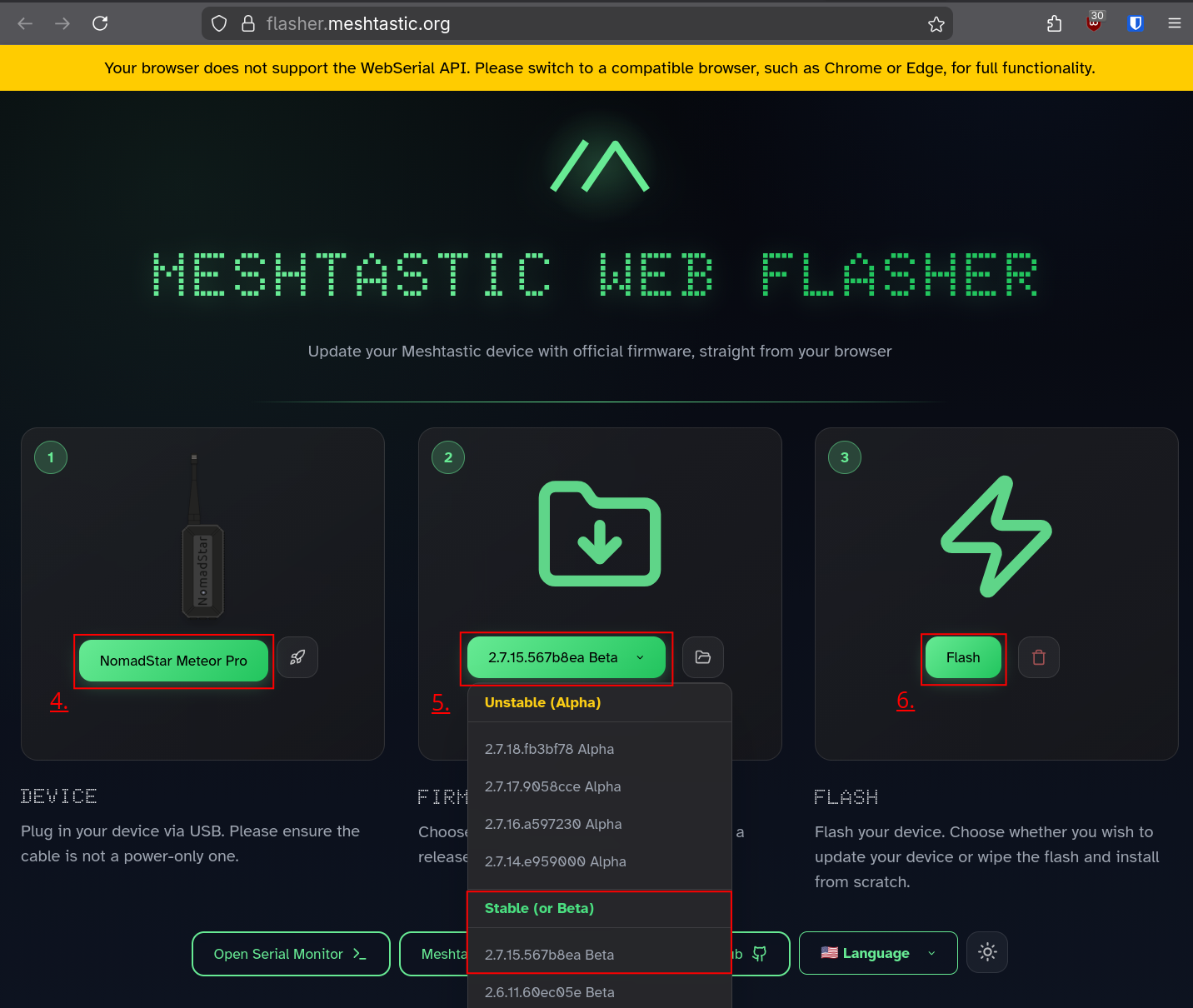](https://glacier.alpservices.link/bookstack-nomadstar/uploads/images/gallery/2026-01/ncDKdY5MlHGajlq2-screenshot-from-2026-01-30-12-24-58.png) --- ### Important notes - Do not disconnect the USB cable or close the browser during flashing. - Ensure your computer remains powered and does not enter sleep mode. - Only use official Meshtastic firmware or firmware verified by Nomadstar SARL. - In case of failed updates or unusual behavior, contact Nomadstar support for assistance. # Datasheet| Battery | Li-ion NCR-18650BF 3.6V 3350mAh |
| Electrical specifications | Input power: 5 V DC, max 1 A (via USB-C) |
| Power consumption | Typical power consumption: ~1W during operation |
| Dimensions | 110mm x 51mm x 47mm |
| Weight | 250g |
| Connector | USB-C (data and charge) |
| Operational / Storage humidity | 0% to 100% (non-condensing) |
| Operational and Storage temperatures | -20°C to +60°C |
| LoRa radio frequencies | IN865, EU868, US915, AU915, KR920, AS923, RU864 |
| Output radio power | 0.25W |
| Short range wireless connectivity | BLE 5.0 |
| GNSS | GPS, GLONASS, Galileo, BDS, QZSS |
| Encryption | AES256 |
| Range | 50Km with line of sight [(and even more)](https://meshtastic.org/docs/overview/range-tests/) |
| Operating system | [Meshtastic firmware](https://meshtastic.org/) |
| Certifications | CE / RoHS / RED / WEEE |
| Ingress protection | IP66 |
| Origin | Swiss made |
**Do not open or modify** the Meteor Pro yourself. Opening the enclosure voids the warranty and may compromise safety or compliance.
For repairs, calibration, or component replacement, contact: **Nomadstar SARL – Technical Support**| Type of risk | Description |
|---|---|
| **Electrical** | Risk of short-circuit or electric shock if the housing is opened or if moisture enters connectors. |
| **Battery** | Risk of fire, swelling or leakage if the internal Li-ion battery is punctured, shorted, overheated or replaced with a non-approved battery. |
| **Mechanical** | Damage may occur if the device is dropped, subjected to vibration or improperly mounted. |
Using the device outside of the specified conditions may increase these risks and void compliance and warranty.
# Manufacturer & compliance information ## Manufacturer **Nomadstar Sàrl** c/o Colab Sàrl Chemin de la Fonderie 2 1700 Fribourg, Switzerland [https://nomadstar.ch](https://nomadstar.ch/)The device meets the essential requirements and other relevant provisions of the RED Directive 2014/53/EU. A Declaration of Conformity (DoC) is available upon request.
### Labels and Symbols The following marks are present on the product label:| Symbol | Meaning |
|---|---|
| [](https://glacier.alpservices.link/bookstack-nomadstar/uploads/images/gallery/2025-10/P2W0SsfhLklh0Sjx-conformite-europeenne-logo.png) | Conformity with EU directives 2014/53/EU RED Directive 2011/65/EU RoHS Directive EN IEC 62368-1:2020 EN 55032:2015+A11:2020 EN 55035:2017+A11:2020 EN 300 328 V2.2.2 EN 300 220-2 V3.3.1 |
| [](https://glacier.alpservices.link/bookstack-nomadstar/uploads/images/gallery/2025-10/IGJDBZ1Xgjn2wTxy-weee-symbol-vectors.png) | Waste Electrical and Electronic Equipment Directive 2012/19/EU Directive DEEE 2012/19/UE |
All symbols comply with IEC 60417 and ISO 7000 graphical symbol standards.
Do not attempt to open, modify, or repair the Meteor Pro yourself. For service, maintenance, or disposal, contact Nomadstar SARL or an authorized partner.
The Meteor Pro is designed for **field communication and geolocation.** Any use outside the scope defined by Nomadstar SARL — such as modification of internal components, or use with unexpected accessories — may void compliance and warranty.
# End of life and recycling ### Environmental responsibility Nomadstar SA is committed to minimizing the environmental impact of its products throughout their lifecycle. At the end of its service life, the Meteor Pro must **not be disposed of as household waste**. --- ### WEEE directive This product is marked with the symbol of a crossed-out wheeled bin in accordance with the European Directive 2012/19/EU (WEEE). This indicates that electrical and electronic equipment must be collected and recycled separately. Dispose of the device at an authorized collection point for electronic waste or return it to Nomadstar SARL for proper recycling. --- ### Battery disposal The internal **Li-ion battery** contains valuable and potentially hazardous materials. - Do not incinerate, crush, or open the battery. - Do not dispose of batteries in household waste. - Hand them over to designated collection facilities or return them with the device to Nomadstar SARL.Battery specification reminder: **Type:** Li-ion 18650 NCR18650BF **Voltage:** 3.6 V **Capacity:** 3350 mAh
--- ### Disassembly and recycling Disassembly should only be performed by qualified personnel. It involves removal of the enclosure screws, detachment of the PCB, and safe extraction of the battery. Recycling should follow the applicable local regulations for electronic assemblies, aluminum housings, and lithium-based cells. --- ### Disposal declaration Improper disposal of this product or its battery may cause environmental harm or violate local regulations. Please follow local recycling programs or contact Nomadstar SA for assistance with responsible disposal.